REST Client API Access
Main Data API protocol is based on RESTful Web services over TLS.
REST URLs, HTTP methods, content types and other HTTP headers are documented in SMIP Data API.
Standard HTTP status codes are used to signal the success or failure of a request. Error responses also contain a JSON message with detailed internal error codes and descriptions where applicable (see Error Codes).
Authentication
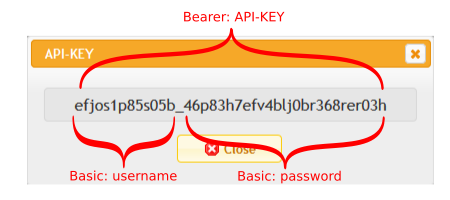
API Client must send an appropriate API-KEY in each request. API-KEY may be obtained by logging into SMIP’s UI and using the Data API Account Manager application to create a new API account and API-KEY.
The API-KEY must be sent inside the Authorization HTTP header and may use:
Authorization: Basic {BASE64(USER:PASSWORD)}Authorization: Bearer {API-KEY}
Authorization
API Client is authorized by SMIP Administrators to access specific Instances. Real time data, thing data, thing events, push subscriptions and similar API-s may be available to the client depending on each instance’s type and access configuration.
API clients may access a list of their authorized instances using User Instance Manager application in SMIP or by calling appropriate APIs like READ all instances info API.
MQTT Client API Access
If API Clients need to connect to SMIP using the MQTT protocol, they must create a session by calling an appropriate REST API like CREATE push session API and obtain the new session’s id.
Authentication
MQTT Connection parameters:
protocol:
MQTT 3.1.1overTLS 1.2hostname: the same as used by REST APIs
port:
8883user: first part of API-KEY (see basic username in Authentication)
password: second part of API-KEY (see basic password in Authentication)
client id:
session idobtained from a previous REST API callMQTT parameter:
clean session: true
Topic Subscription Authorization
MQTT API Clients may subscribe only to MQTT topics obtained from calling appropriate REST APIs like for example CREATE push session API or READ push session info API.
Trying to subscribe to other MQTT topics will force-close the MQTT client’s connection on the current session.
Other not intended uses of specific MQTT connections will also result in force-closed MQTT connections, e.g., trying to publish a message on a push session is prohibited.